
Response
Review every website enquiry without digging through inboxes
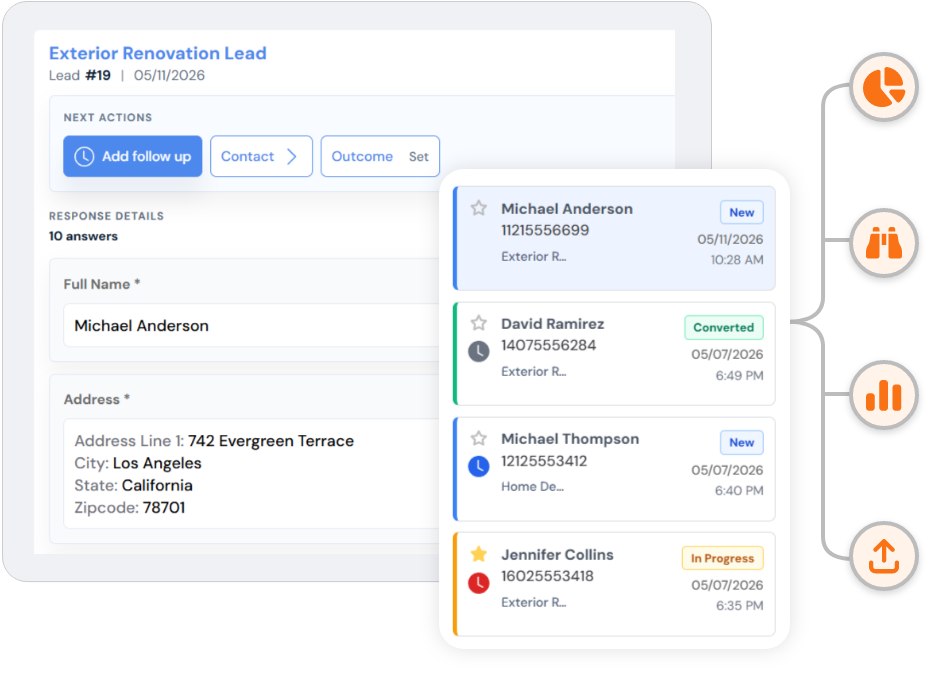
A form response should be easier to review than a forwarded email. SmartFormify has Inbox, Follow up, Important, and Trash views for submitted responses, with detail panels for answers, contact info, files, notes, status, outcomes, print, and PDF.
Exact response views
Use Inbox, Follow up, Important, and Trash without losing context
Responses can be reviewed in list or table view, searched by keyword, filtered by custom date range or preset ranges, marked read or unread, marked important, restored from trash, or opened directly from a response link.
Filter
Search by keyword and filter by dates such as 1 day, 3 days, 1 week, 1 month, 6 months, or 1 year.
Status
Move work through New, Contacted, In Progress, Converted, or Closed.
Files
Open photos, documents, and references from the same response detail panel.
Records
Print or download a PDF when the response needs to be shared outside the dashboard.
Response detail
A website response can include several kinds of follow-up context
Quote request
Scope, location, budget, 3 files
New
Booking request
Service, preferred date, callback time
Follow up due
Client intake
Goals, current setup, first-call notes
In progress
Internal note
Comment added before callback
Note saved
Outcome
Reached, interested, call back later, or no answer
Tracked
Contact modal
Detected contact fields shown for quick review
Review