
Form Analytics
Read response stats from the dashboard
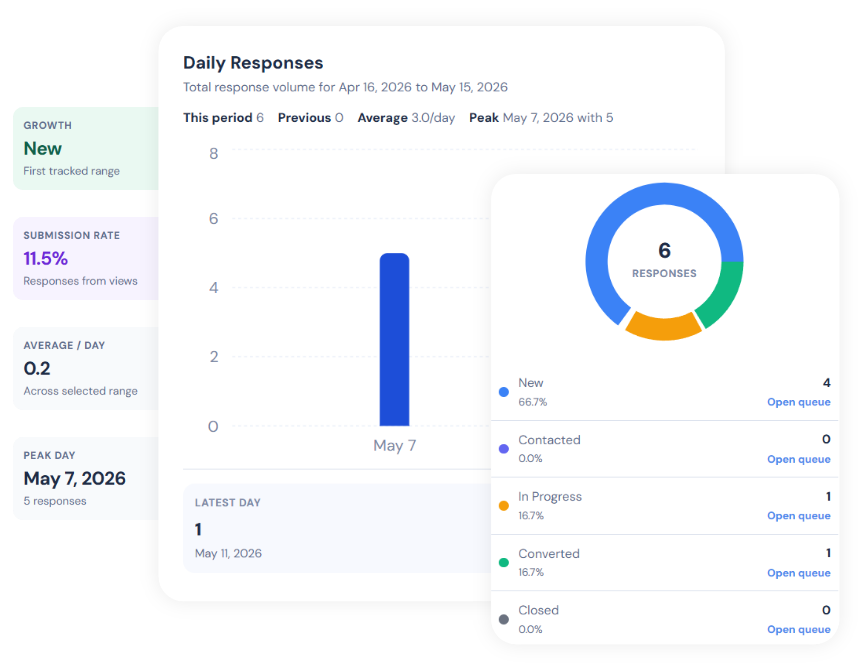
SmartFormify's stats screen is tied to responses. It shows overview totals, daily responses, daily outcomes, pipeline status, and follow-up health so you can see what needs attention.
Exact stats
The stats are built around submitted responses
This page describes the response stats screen in SmartFormify: counts, outcomes, status, and follow-up timing from the response area.
Overview
See the total responses in the selected date range before opening individual submissions.
Daily responses
Review how submissions are distributed by day inside the response stats screen.
Daily outcomes
Check how saved response outcomes change across the active date range.
Pipeline status
See New, Contacted, In Progress, Converted, and Closed response counts.
Follow-up health
Spot responses that need follow-up, are due today, overdue, or have no date.
Follow-up view
Use stats to find stuck responses, not to guess at traffic
A response can be marked New, Contacted, In Progress, Converted, or Closed. Follow-up health then shows what needs a reply, what is due today, what is overdue, and which responses have no follow-up date yet.
Need follow up
Responses marked for follow-up work.
Due today
Responses that should be handled today.
Overdue
Follow-up dates that have already passed.
No date
Responses missing a scheduled follow-up date.