
How to Centralize Leads From Multiple Websites
Learn how to centralize leads from multiple websites into one dashboard so you can manage enquiries, respond faster, and never miss a potential customer.
Many businesses operate more than one website.
You might have:
- Your main business website
- A landing page for advertising
- A product website
- A local business website
- A portfolio website
- A seasonal campaign website
Each website helps attract potential customers.
The challenge begins when enquiries start arriving from all of them.
Some leads arrive by email.
Some are stored in different systems.
Some are managed by different team members.
Keeping track of everything quickly becomes difficult.
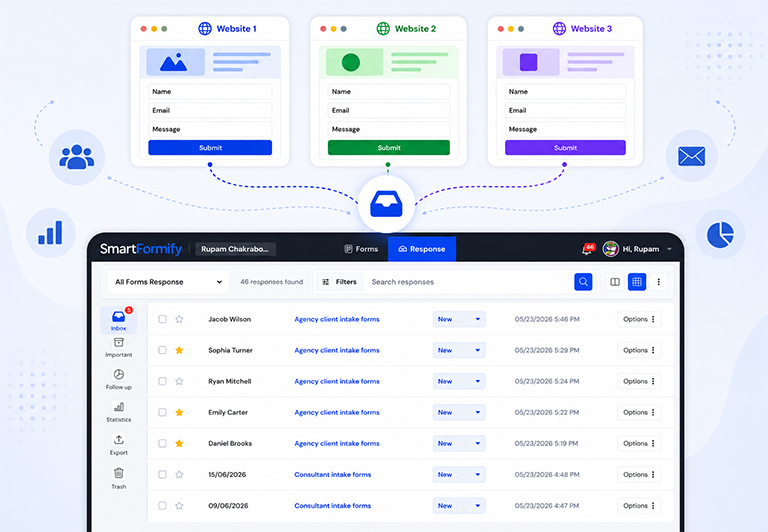
A much better approach is to centralize all your website leads into one dashboard.
Why Businesses Have Multiple Websites
There are many reasons businesses create more than one website.
For example:
A marketing agency may have separate websites for web design, SEO, and branding.
A construction company may have different websites for residential and commercial services.
A business may also create dedicated landing pages for advertising campaigns.
Each website has its own contact form, but all enquiries still belong to the same business.
The Problem With Separate Lead Sources
When every website sends enquiries somewhere different, problems appear quickly.
Your team may need to check:
- Multiple email accounts
- Different contact forms
- Separate spreadsheets
- Various software tools
This creates unnecessary work.
More importantly, it increases the chance of missing valuable customer enquiries.
Why One Dashboard Makes Sense
A central dashboard gives your business one place to manage every lead.
Instead of opening several systems each day, your team can review every enquiry from one location.
This makes it easier to:
- View new leads
- Search previous enquiries
- Respond faster
- Stay organized
- Track customer conversations
Everything becomes much simpler.
Keep Every Website
Centralizing your leads does not mean replacing your websites.
You can continue using:
- Your existing websites
- Your current contact forms
- Your branding
- Your landing pages
- Your marketing campaigns
Only the destination of each submission changes.
Visitors continue using the same forms while your business manages every enquiry from one place.
Know Where Every Lead Came From
When multiple websites send enquiries to one dashboard, it is still important to know which website generated each lead.
This helps you:
- Measure marketing performance
- Understand which websites generate the most enquiries
- Improve advertising campaigns
- Identify your strongest lead sources
Knowing where enquiries come from helps you make better business decisions.
Respond Faster
When all leads appear in one place, your team spends less time searching and more time helping customers.
Instead of wondering which website received the enquiry, everyone knows exactly where to look.
This can improve response times and create a better customer experience.
Continue Receiving Notifications
A central dashboard does not replace notifications.
Your team can still receive email alerts whenever a new enquiry arrives.
The dashboard simply provides a permanent record of every submission, making it easier to review and manage enquiries later.
Help Reduce Spam
Managing spam across several websites can become frustrating.
Using one submission management system allows you to apply the same spam protection across all your website forms.
This helps reduce unwanted submissions while keeping genuine customer enquiries organized.
Connect Every Website With SmartFormify
SmartFormify Connect allows you to connect existing website forms without changing their design.
Each website can continue using its own contact form while SmartFormify receives and manages every submission.
Once connected, SmartFormify can:
- Receive submissions from multiple websites
- Store every response
- Send notification emails
- Display after submission messages
- Help reduce spam
- Organize all enquiries in one dashboard
This allows your business to manage leads from different websites without switching between multiple systems.
A Practical Example
Imagine a property management company.
It operates four different websites.
One promotes residential properties.
Another focuses on commercial properties.
A third is used for holiday rentals.
The fourth supports advertising campaigns.
Previously, every website sent enquiries to different email accounts.
Staff spent time searching through several inboxes to find customer requests.
After connecting each website form to SmartFormify, every enquiry appears in one dashboard.
The team can immediately see new leads, search previous conversations, and respond without worrying about which website the enquiry came from.
Test Every Website
After connecting multiple websites, submit test enquiries from each one.
Confirm that:
- Every website sends submissions successfully.
- Notification emails arrive.
- Responses are stored correctly.
- The correct website can be identified.
- Thank you messages display properly.
Testing ensures every website is working before customers begin submitting enquiries.
Common Mistakes to Avoid
Many businesses continue managing each website separately even though the enquiries belong to the same team.
Others depend entirely on email and never store submissions anywhere else.
Some even rebuild perfectly good contact forms instead of simply connecting them to one submission management system.
Avoiding these mistakes makes lead management much more efficient.
Final Thoughts
Managing leads from multiple websites does not have to be complicated.
By centralizing every enquiry into one dashboard, your business can stay organized, respond faster, and reduce the chance of missing valuable opportunities.
With SmartFormify Connect, you can connect your existing website forms without changing their design.
Every submission can be stored, notifications can be sent automatically, spam can be reduced, and your entire team can manage customer enquiries from one central dashboard, regardless of how many websites your business operates.
Share this post


Latest posts
8 min read
How to Collect Leads From ChatGPT, Lovable, Bolt and Other AI Websites
7 min read
How to Connect AI Built Websites to a Form Backend
8 min read
How Agencies Can Manage Client Website Forms More Efficiently
8 min read
Best Contact Form Solution for Small Businesses
8 min read
What Is a Form Endpoint and Why Does Your Website Need One?