
How to Connect AI Built Websites to a Form Backend
Learn how to connect AI built websites to a form backend so contact forms can receive submissions, send notifications, and manage customer enquiries reliably.
Artificial intelligence has completely changed how websites are created.
Today, you can describe your business, choose a style, and generate a professional website within minutes.
Many AI website builders also create contact forms automatically.
Everything looks complete.
Your pages are ready.
Your contact form is in place.
Then someone fills out the form.
The question is simple.
Where does the information go?
A contact form needs more than a beautiful design.
It also needs a backend that can receive, process, and manage every submission.
Fortunately, you do not need to rebuild your AI generated website to add one.
What Is a Form Backend
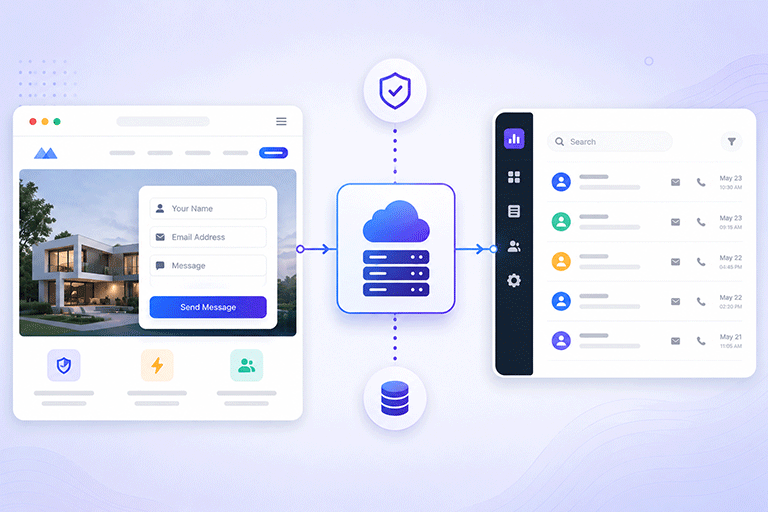
A form backend is the service that receives information after someone submits a form.
It works behind the scenes and performs tasks such as:
- Receiving submissions
- Saving customer enquiries
- Sending notification emails
- Displaying thank you messages
- Helping reduce spam
- Organizing responses
Without a backend, your contact form has nowhere reliable to send the information.
Why AI Built Websites Need a Backend
Most AI website builders focus on generating the website itself.
They create:
- Home pages
- Service pages
- About pages
- Contact pages
- Contact forms
The visual design is completed very quickly.
However, many AI generated forms still need a backend to handle what happens after someone clicks Submit.
Without this connection, enquiries may never reach your business.
Keep the Website You Already Have
Many business owners worry they will need to redesign their website.
That is usually not necessary.
You can keep:
- Your existing website
- Your AI generated design
- Your branding
- Your colors
- Your contact form
Only the submission process changes.
Visitors continue using the same form while the backend manages everything behind the scenes.
Connect Instead of Rebuild
Replacing a working contact form usually creates unnecessary work.
If visitors already understand how to use your form, it is often better to keep it.
Instead of rebuilding the form, connect it to a backend that can process submissions reliably.
This is faster, easier, and keeps your website looking exactly the way you intended.
Receive Every Customer Enquiry
One of the biggest benefits of using a backend is reliability.
Every form submission can be received and processed correctly.
This reduces the chance of losing valuable customer enquiries because of missing email scripts or incomplete website setup.
Store Every Submission
Email notifications are useful, but they should not be your only record.
A backend should also store every submission in a dashboard.
This allows you to:
- Search previous enquiries
- Review customer information
- Track conversations
- Follow up more easily
Having a complete submission history makes customer management much simpler.
Send Notification Emails
When someone submits your contact form, your team should know immediately.
A backend can automatically send notification emails whenever a new enquiry arrives.
This helps businesses respond more quickly while ensuring every enquiry is also stored safely.
Show a Thank You Message
Visitors like confirmation that their enquiry has been received.
A backend can display a thank you message or redirect visitors to another page after submission.
This improves the customer experience and reduces duplicate submissions caused by uncertainty.
Help Reduce Spam
Public contact forms often attract automated spam.
A modern backend can help reduce unwanted submissions while keeping the form simple for genuine visitors.
Instead of making customers complete complicated challenges, spam protection can work quietly behind the scenes.
Keep Everything Organized
As your business grows, managing enquiries becomes more important.
Instead of searching through email folders, a backend allows you to manage submissions from one dashboard.
This helps you:
- View new enquiries
- Search previous submissions
- Review customer details
- Keep conversations organized
- Respond more efficiently
Everything is available in one place.
Connect AI Built Websites With SmartFormify
SmartFormify Connect allows you to connect existing AI built website forms without changing their appearance.
Instead of replacing the contact form created by your AI website builder, you simply connect it to SmartFormify.
Once connected, SmartFormify can:
- Receive submissions
- Store responses
- Send notification emails
- Display after submission messages
- Help reduce spam
- Organize customer enquiries in one dashboard
Your website continues looking exactly the same while SmartFormify manages everything behind the scenes.
A Practical Example
Imagine a local law firm that creates its website using an AI website builder.
The website includes a professional contact form, but after launching, the firm realizes enquiries are not being managed properly.
Instead of rebuilding the website, the contact form is connected to SmartFormify Connect.
Now every enquiry is stored, notification emails are sent automatically, and the firm can review all customer requests from one dashboard.
The website design remains unchanged, but the contact form becomes much more reliable.
Test Before Launch
After connecting your AI built website to a backend, always test the form.
Submit several sample enquiries and confirm that:
- The form submits successfully.
- Notification emails arrive.
- Responses are stored.
- Thank you messages appear correctly.
- Spam protection works properly.
A few minutes of testing can prevent valuable customer enquiries from being lost.
Common Mistakes to Avoid
Many businesses assume that because an AI website builder created a contact form, it is already connected to a backend.
Others rebuild the entire website when only the submission process needs improvement.
Some rely only on email notifications without storing submissions anywhere else.
Avoiding these mistakes helps create a more reliable and professional website.
Final Thoughts
AI website builders make creating websites faster than ever, but every contact form still needs a reliable backend.
Without one, enquiries may never reach your business or be managed effectively.
The good news is that you do not need to replace your AI built website or redesign your contact form.
With SmartFormify Connect, you can connect your existing AI built website to a reliable form backend that receives submissions, stores responses, sends notification emails, helps reduce spam, and manages every customer enquiry from one central dashboard.
Share this post


Latest posts
8 min read
How to Collect Leads From ChatGPT, Lovable, Bolt and Other AI Websites
8 min read
How Agencies Can Manage Client Website Forms More Efficiently
8 min read
Best Contact Form Solution for Small Businesses
5 min read
How to Centralize Leads From Multiple Websites
8 min read
What Is a Form Endpoint and Why Does Your Website Need One?