
How to Connect Multiple Website Forms to One Dashboard
Learn how to connect multiple website forms to one dashboard so you can manage enquiries, track submissions, and stay organized from one place.
As your business grows, one contact form is often no longer enough.
You may have:
- A contact form
- A quote request form
- A booking request form
- A support form
- A job application form
- A feedback form
Each form serves a different purpose.
The problem is that managing submissions from several forms can quickly become difficult.
Some enquiries arrive by email.
Others are stored somewhere else.
Some are missed completely.
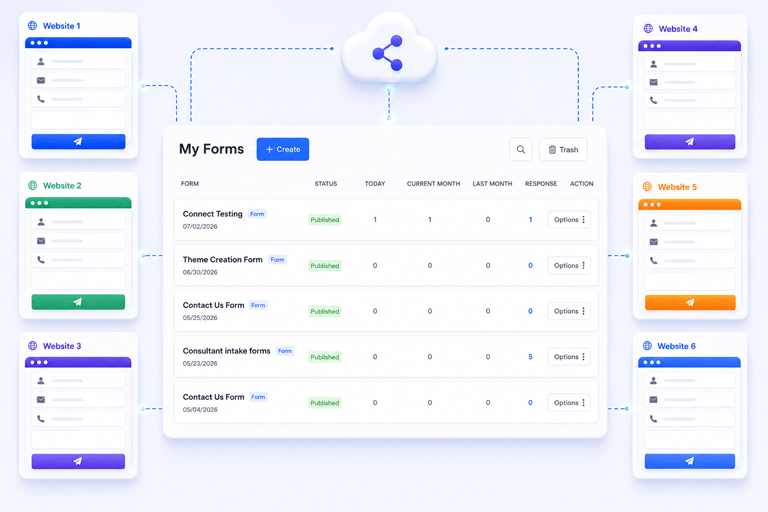
Instead of checking multiple places every day, you can connect your website forms to one dashboard and manage everything from a single location.
Why Businesses Create Multiple Forms
Different visitors have different needs.
Someone looking for a price quote should not complete the same form as a job applicant.
Likewise, a customer requesting support should not use a booking form.
Creating separate forms makes the experience easier for visitors because they only answer questions that are relevant to them.
It also helps your business collect better information.
The Problem With Multiple Forms
While having several forms is useful, managing them can become confusing.
You might receive:
- Contact enquiries in one inbox
- Quote requests in another system
- Booking requests by email
- Job applications in a spreadsheet
Over time, this creates extra work.
Your team spends more time searching for information than responding to customers.
Why One Dashboard Makes Life Easier
A single dashboard brings every submission together.
Instead of opening multiple tools throughout the day, you can review all enquiries from one place.
This makes it easier to:
- View new submissions
- Search previous enquiries
- Follow up with customers
- Track conversations
- Stay organized
Everything becomes much easier to manage.
Keep Every Form on Your Website
Connecting multiple forms to one dashboard does not mean replacing your website.
You can continue using:
- Your existing contact form
- Quote request forms
- Booking forms
- Support forms
- Feedback forms
Each form keeps its own design and purpose.
The only change is where the submissions are sent.
Organize Different Types of Enquiries
Different forms usually collect different information.
For example:
A contact form may ask for:
- Name
- Message
A booking form may ask for:
- Preferred date
- Preferred time
- Service type
A job application form may ask for:
- Experience
- Position
- Resume
Even though these forms collect different information, a central dashboard allows you to manage them together while keeping each submission organized.
Respond Faster
When every enquiry appears in one place, your team spends less time searching and more time helping customers.
Instead of wondering where a submission was received, everyone knows exactly where to look.
This can improve response times and create a better customer experience.
Never Lose Important Enquiries
Depending only on email is risky.
Emails can:
- Be deleted accidentally
- Go to spam
- Be filtered into another folder
- Get buried under newer messages
A dashboard stores every submission, making it much easier to review previous enquiries whenever needed.
Receive Notifications for Every Form
Even if all submissions are stored in one dashboard, you can still receive notification emails when someone submits a form.
This allows your team to respond quickly while keeping a permanent record of every enquiry.
You receive the convenience of email together with the reliability of centralized submission management.
Help Reduce Spam
Public forms often receive unwanted submissions.
Managing spam across several forms can waste a significant amount of time.
Using one submission system allows you to apply the same protection across all your website forms, helping reduce unwanted messages while keeping genuine enquiries easy to find.
SmartFormify Connect Makes It Simple
If your website already has several forms, you do not need to rebuild them.
With SmartFormify Connect, you can connect your existing forms to SmartFormify while keeping their current appearance.
Once connected, SmartFormify can:
- Receive submissions
- Store responses
- Send notification emails
- Show after submission messages
- Help reduce spam
- Keep enquiries organized in one dashboard
This allows your business to continue using the same website while managing responses much more efficiently.
A Real Business Example
Imagine a home service company.
Its website includes:
- Contact Us
- Request a Quote
- Book an Inspection
- Customer Support
Each form receives enquiries every day.
Without a central dashboard, staff must search through different email folders and systems to find customer requests.
After connecting these forms to one dashboard, every submission appears in a single location.
The website remains exactly the same, but managing customer enquiries becomes much easier.
Test Every Form
After connecting your forms, test each one individually.
Submit sample enquiries and confirm that:
- Every form sends submissions successfully.
- Notification emails arrive.
- Responses are stored correctly.
- Thank you messages appear.
- Spam protection works properly.
Testing helps ensure every form is working before customers begin using it.
Common Mistakes to Avoid
Many businesses create multiple forms but never organize the submissions.
Others rely entirely on email and have no central record of customer enquiries.
Some even rebuild forms unnecessarily instead of simply connecting them to a better submission system.
Avoiding these mistakes saves time and helps prevent lost business opportunities.
Final Thoughts
Having multiple website forms is a normal part of running a growing business.
Separate forms help collect better information, but managing them should not become more complicated.
Connecting every form to one dashboard allows you to keep your existing website while making submissions easier to manage, search, and respond to.
With SmartFormify Connect, you can connect your existing website forms without changing their design, giving your business one place to receive submissions, organize customer enquiries, send notifications, and manage every response with confidence.
Share this post


Latest posts
8 min read
How to Collect Leads From ChatGPT, Lovable, Bolt and Other AI Websites
7 min read
How to Connect AI Built Websites to a Form Backend
8 min read
How Agencies Can Manage Client Website Forms More Efficiently
8 min read
Best Contact Form Solution for Small Businesses
5 min read
How to Centralize Leads From Multiple Websites