
Form Endpoint vs Form Builder: Which One Should You Use?
Learn the difference between a form endpoint and a form builder. Discover which option is best for your website, business, and customer enquiry workflow.
If you want to collect enquiries from your website, you need a way for visitors to submit their information.
Today, businesses have two popular options.
The first is a form builder, where you create the entire form from scratch.
The second is a form endpoint, where you keep your existing contact form and simply connect it to a service that receives and manages submissions.
Both approaches work well, but they are designed for different situations.
Understanding the difference will help you choose the right solution for your website.
What Is a Form Builder
A form builder is a tool that allows you to create a complete online form.
You choose the fields, customize the design, publish the form, and start collecting responses.
Most form builders allow you to create forms such as:
- Contact forms
- Quote request forms
- Booking forms
- Event registration forms
- Surveys
- Job application forms
If you do not already have a contact form, a form builder is often the easiest place to start.
What Is a Form Endpoint
A form endpoint works differently.
Instead of creating a new form, it receives submissions from a form that already exists.
Your website keeps the same contact form and design.
Only the destination of the submitted information changes.
The endpoint receives the data, stores it, sends notifications, and manages the submission behind the scenes.
For businesses that already have a website, this is often a much simpler solution.
When a Form Builder Makes Sense
A form builder is usually the best choice if:
- You are building a brand new website.
- You do not have an existing contact form.
- You want to create forms without writing code.
- You need complete control over the fields and layout.
- You want ready to use templates.
Everything can be created in one place, making it ideal for businesses starting from scratch.
When a Form Endpoint Is the Better Choice
A form endpoint is often the better option when:
- Your website already has a contact form.
- You like your current design.
- You built your website using an AI website builder.
- You have a custom website.
- You do not want to redesign your form.
Instead of replacing the form, you simply connect it to the endpoint and continue using the same customer experience.
Keep Your Existing Design
One of the biggest advantages of using a form endpoint is that your website does not change.
You keep:
- Your branding
- Your colors
- Your layout
- Your contact form
- Your customer experience
Visitors continue using the same form they already know.
Only the submission process improves behind the scenes.
Submission Management
Whether you use a form builder or a form endpoint, managing submissions is important.
A good solution should allow you to:
- Store every enquiry.
- Search previous submissions.
- Review customer messages.
- Respond quickly.
- Keep everything organized.
Having one place to manage responses is much better than relying only on email notifications.
Email Notifications
Both options should notify you when someone submits a form.
Instead of checking your website throughout the day, you receive an email whenever a new enquiry arrives.
Fast notifications help businesses respond more quickly and improve customer service.
Spam Protection
Public forms often attract unwanted spam.
Whether you choose a form builder or a form endpoint, look for built in protection that helps reduce automated submissions without making the form difficult for real visitors.
Good spam protection improves security while keeping the experience simple.
Which Option Is Easier
The answer depends on your website.
If you are creating a completely new form, a form builder is usually the easiest option.
If you already have a working website with a contact form, connecting a form endpoint is often much faster because there is no need to rebuild anything.
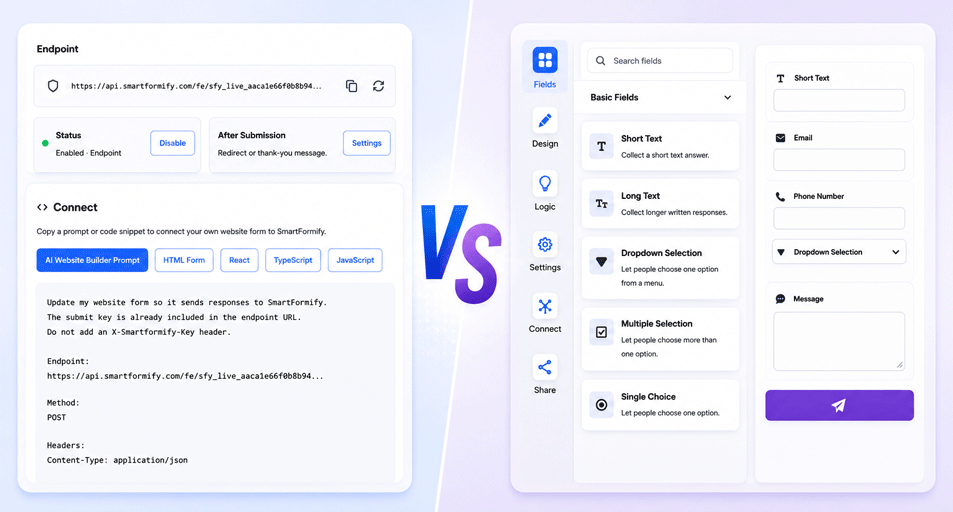
SmartFormify Gives You Both Options
Every business has different needs.
Some businesses are starting a new website.
Others already have a website that works perfectly and only need better submission management.
SmartFormify supports both approaches.
You can use the SmartFormify Form Builder to create professional online forms from scratch.
Or you can use SmartFormify Connect to connect an existing website form without changing its design.
This gives businesses the flexibility to choose the solution that fits their website.
Which One Should You Choose
Choose a form builder if you:
- Need to create a brand new form.
- Want templates and visual editing.
- Are starting a new project.
Choose a form endpoint if you:
- Already have a contact form.
- Want to keep your website unchanged.
- Built your website with an AI website builder.
- Have a custom website.
- Only need better submission handling.
The right choice depends on what you already have.
Common Mistakes
Some businesses rebuild their entire contact form when they only need a better way to receive submissions.
Others continue relying only on email without saving enquiries anywhere else.
Some replace a perfectly good website design even though only the submission process needs improvement.
Choosing the right solution from the beginning saves time and avoids unnecessary work.
Final Thoughts
Both form builders and form endpoints are valuable tools, but they solve different problems.
A form builder helps you create new forms from the ground up.
A form endpoint helps you connect forms that already exist.
If you are starting from scratch, a form builder is an excellent choice.
If your website already has a contact form that you want to keep, connecting it through SmartFormify Connect is often the faster and more practical solution.
With SmartFormify, you do not have to choose one approach forever. You can build new forms when you need them or connect your existing website forms, giving you the flexibility to manage customer enquiries in the way that works best for your business.
Share this post


Latest posts
8 min read
How to Collect Leads From ChatGPT, Lovable, Bolt and Other AI Websites
7 min read
How to Connect AI Built Websites to a Form Backend
8 min read
How Agencies Can Manage Client Website Forms More Efficiently
8 min read
Best Contact Form Solution for Small Businesses
5 min read
How to Centralize Leads From Multiple Websites