
How to Create a Client Inquiry Form That Converts Visitors
Turn website visitors into potential clients with a well-structured inquiry form built for clarity.
Your website may be getting visitors every day, but without a proper inquiry form, many potential clients leave without contacting you. A well-designed client inquiry form helps you capture quality leads, understand client needs, and start meaningful conversations.
With SmartFormify, you can create a professional client inquiry form in minutes — without any coding.
Client Inquiry Form Benefits
Adding a client inquiry form to your website helps you:
- Capture better leads by collecting important details like service needs, budget, and timeline.
- Save time by reducing back-and-forth emails with structured information upfront.
- Improve conversions with a clear, guided process that encourages visitors to take action.
- Stay organized by keeping all inquiries in one place.
Using SmartFormify, you can create a smart inquiry form with logic, easy sharing, and website embedding — helping turn visitors into real potential clients.
Why Your Client Inquiry Form Matters
When visitors decide to contact you, they are already interested. At that moment:
- Confusing forms create friction
- Too many unnecessary fields cause drop-offs
- Poor structure reduces response quality
- No logic means irrelevant questions
A strategic inquiry form guides users smoothly, captures essential information, and increases the likelihood of meaningful client conversations.
How to Create a Client Inquiry Form Using SmartFormify
Creating a professional client inquiry form in SmartFormify is simple and requires no coding. Follow this step-by-step process:
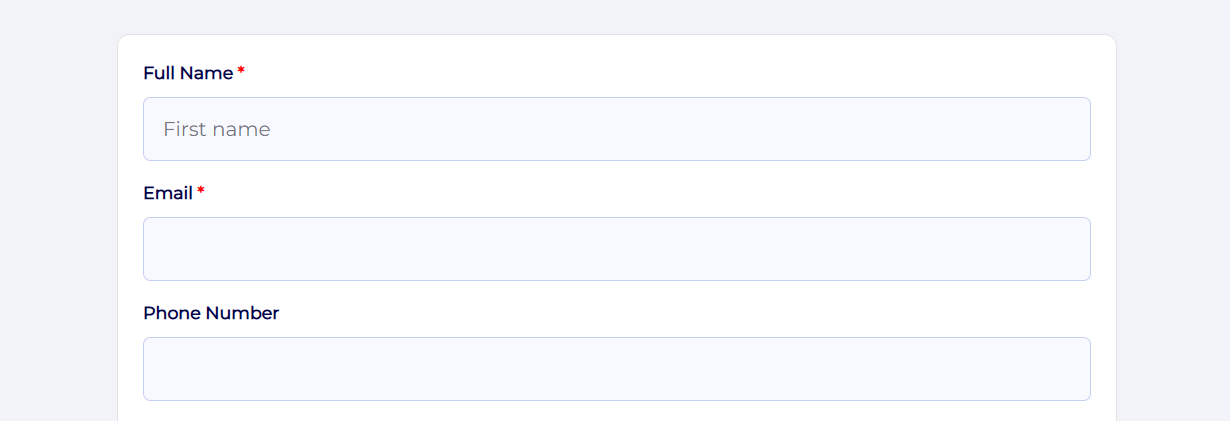
Step 1 — Create a New Form
- Login to your SmartFormify dashboard.
- Create a new form or select an existing form.
- Choose a theme or a ready template if you need.
Step 2 — Add Basic Contact Fields
Drag and drop essential fields like:
- Full Name
- Email Address
- Phone Number (optional)
- Company Name or Brif
This ensures you can easily contact potential clients.
Step 3 — Add Service Requirement Field
Insert a dropdown or multiple-choice field:
Question: What service do you need?
Options:
- Website Development
- Digital Marketing
- App Development
- Consultation
Step 4 — Apply Conditional Logic
Use SmartFormify logic to keep the form short and relevant.
Example:
- If user selects Website Development → Show “Website Type” field.
- If user selects Consultation → Show “Preferred Meeting Time”.
Step 5 — Add Project Details Fields
Include qualification questions such as:
- Project Description
- Expected Timeline
- Budget Range
Step 6 — Customize Submit Button
- Change button text to “Request a Quote” or “Start My Project”.
- Copy share link or embed the form on your website.
Step 7 — Use Smart Flow (Step-by-Step Form Display)
Enable the Smart Flow feature to show form fields one step at a time instead of displaying everything at once.
Benefits of Smart Flow:
- Makes the form feel simple and interactive.
- Reduces user overwhelm.
- Improves completion rate.
- Guides users smoothly through each section.
Example flow:
- Step 1 → Contact Details
- Step 2 → Service Selection
- Step 3 → Project Details
- Step 4 → Submit Request
Step 8 — Share and Embed Your Form
Once your client inquiry form is ready:
- Share it via social media link.
- Embed it on your event website.
- Include it in email campaigns.
All responses will be automatically stored and organized in your dashboard.
Final Thoughts
A well-structured client inquiry form can turn casual visitors into qualified leads.
Using SmartFormify, you can build professional, smart, and conversion-focused forms without technical skills — making lead capture faster, easier, and more effective.
Start creating your client inquiry form today and turn website visitors into real business opportunities.

Share this post


Latest posts
8 min read
How to Collect Leads From ChatGPT, Lovable, Bolt and Other AI Websites
7 min read
How to Connect AI Built Websites to a Form Backend
8 min read
How Agencies Can Manage Client Website Forms More Efficiently
8 min read
Best Contact Form Solution for Small Businesses
5 min read
How to Centralize Leads From Multiple Websites