
How to Create a Survey Form with Conditional Logic
Learn how to create effective customer survey forms to collect useful feedback and improve your business. Build and share no-code survey forms easily with Smart
The first few questions in a survey matter a lot. Probably more than we think. They kind of decide right away if someone will continue or just close the page.
If a survey starts with a bunch of questions that don’t feel relevant, it quickly gets annoying. People don’t want to spend time figuring out why they’re being asked something. So they leave. Simple as that.
A good survey, honestly, should feel easy. Not like a task. Just something you can go through without thinking too much.
That’s where conditional logic helps. Instead of showing everything to everyone, the form adjusts based on what someone answers. So it feels a bit more natural, almost like a conversation.
Let’s go through what actually makes a survey work, and how you can build one using SmartFormify.
Important Parts of a Good Survey Form
There’s no complicated formula here. Just a few things that really make a difference.
First, keep your questions simple. Like, really simple. If someone has to read a question twice, that’s already a problem.
Also, don’t stick to just one type of question. Mixing things up helps more than you’d expect. Multiple choice, ratings, dropdowns, short answers. It keeps things moving. Otherwise, it starts to feel repetitive.
Another thing, try not to make the survey too long. It’s tempting to ask everything, but most people won’t finish it anyway. So it’s better to keep it focused.
And yes, mobile matters. A lot of people will open your survey on their phone. If it feels clunky or hard to use, they won’t bother.
How to Create a Customer Survey Form Using SmartFormify
Creating a customer survey form with SmartFormify is simple and does not require any coding. You can quickly build a professional survey form to collect useful customer feedback.
You’ll probably notice this the moment you log in there’s a big option to create a new form right away. Just click Create New Form and you’re basically inside.
If you’ve already played around with the tool before, you don’t have to start over. Open your existing form and continue from there. Most people actually do that once they get comfortable.
There’s a theme setting sitting there too, but honestly, you don’t need to worry about it in the beginning. It’s one of those things you tweak later when everything else is already in place.
Right now, you’re just setting the foundation.
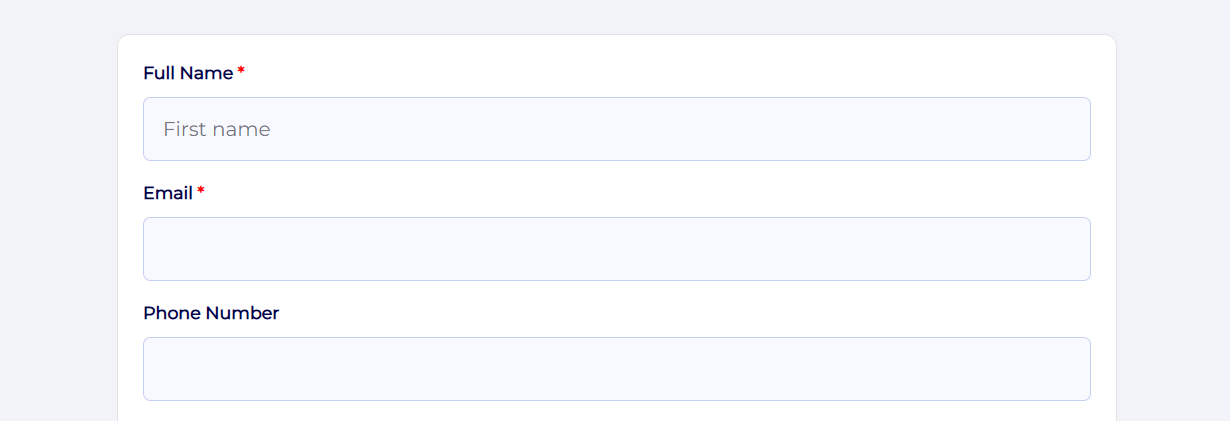
After that, start with the basics contact details.
Nothing fancy here. Just the usual stuff people expect to fill in: name, email, and maybe a phone number if it’s actually useful for you.
The goal isn’t to collect everything it’s to keep it frictionless so people don’t drop off halfway.
Once that’s done, add a bit of context around the interaction.
This is where things start to become meaningful.
When did they use your service? What exactly did they use?
These small details make a huge difference later when you’re trying to understand feedback instead of just reading random responses.
Now comes the important part: the feedback section.
Keep it simple. People don’t want to think too hard here.
A rating scale works well, and then just two honest questions: what they liked, and what didn’t feel right.
That’s usually where the real insights show up anyway.
Then add a recommendation question.
It’s almost a gut check question: Would you recommend this to someone else?
Yes or no is enough. You’d be surprised how much that one answer tells you.
If you want richer responses, you can add a few optional fields at the end.
Things like how they found you, or any extra thoughts they want to share.
Most people will skip it and that’s fine but the ones who don’t usually leave the most useful comments.
Turn on Smart Flow once everything is in place.
This part actually improves completion rate quite a bit. Instead of dumping everything on one long page, it breaks the form into smaller chunks.
So it feels more like a conversation than a checklist.
When it comes to the submit button, don’t leave it plain if you can avoid it.
“Submit” works, but it feels cold.
Something like Send Feedback or Share My Experience feels more natural and slightly more inviting.
And once you’re done, just publish it.
You can share the link anywhere social media, website, email.
Everything lands automatically in your dashboard anyway, so there’s no manual tracking. You just come back later and actually look at the responses instead of managing the process.
Turn Website Visitors into Potential Clients
Survey forms can do more than just collect data. They help you understand your visitors and what they actually need.
When a form is simple and easy to fill, people are more likely to respond. That means you get real feedback, not guesses.
Over time, this helps you improve your website and connect better with your audience. And slowly, visitors start turning into potential customers.
With SmartFormify, you can create clean, easy to use forms that people don’t mind filling out.

Share this post


Latest posts
8 min read
How to Collect Leads From ChatGPT, Lovable, Bolt and Other AI Websites
7 min read
How to Connect AI Built Websites to a Form Backend
8 min read
How Agencies Can Manage Client Website Forms More Efficiently
8 min read
Best Contact Form Solution for Small Businesses
5 min read
How to Centralize Leads From Multiple Websites