
Multi-Step Forms vs Single-Page Forms: Which Converts Better?
Discover whether multi-step or single-page forms convert better. Learn how SmartFormify can boost inquiries with clear, engaging forms
Every website owner wants more inquiries, leads, and potential clients. But something as simple as the form on your site can make or break that goal. If a form feels overwhelming, confusing, or poorly designed, visitors will leave without submitting any information. On the other hand, a clear, well structured form can guide users naturally and increase your chances of converting them into leads.
That’s where SmartFormify comes in. It’s an easy to use, no code form builder designed to make creating professional, high converting forms effortless. Whether you want a single-page form or a multi-step form, SmartFormify lets you build it all without writing a single line of code. You can embed forms directly on your website, share them via links in emails or on social media, and even use conditional logic to show specific questions based on previous answers. This flexibility ensures your forms feel personal and engaging, which is key to boosting conversions.
Before we dive deeper into how SmartFormify can help, let’s look at the types of forms you might use and how they affect user behavior.
Understanding Single-Page Forms
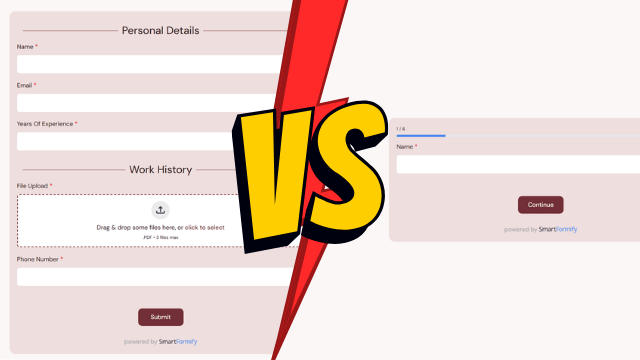
Single-page forms are the classic style you see everywhere. All the questions appear on one page, and the visitor fills them out before clicking submit. This style is simple, transparent, and often effective for short forms. Users can see everything upfront, which helps them understand what’s being asked. For example, a quick contact form asking for name, email, and message works perfectly as a single-page form because it’s fast and straightforward.
The main advantage of single-page forms is speed. Visitors don’t need to click “Next” multiple times or worry about steps—they just scroll, fill, and submit. But when forms become long, they can feel intimidating. Seeing a long list of fields can overwhelm users, causing them to abandon the form before completion. Even minor friction, like unclear labels or poorly organized fields, can reduce your conversion rate.
How Multi-Step Forms Change the Experience
Multi-step forms take a different approach. Instead of presenting all questions at once, they break the form into smaller sections. Visitors answer a few questions at a time and click “Next” to continue. By splitting the form into steps, it feels shorter and more manageable. Even longer forms become less intimidating because users focus on one small section at a time.
Multi-step forms also give you opportunities to enhance engagement. SmartFormify allows you to add progress indicators so visitors know how close they are to finishing. You can also apply conditional logic. For example, if someone selects a specific service they’re interested in, SmartFormify can automatically show follow up questions relevant only to that choice. This personalization reduces clutter, keeps the form relevant, and increases the likelihood of completion.
While multi-step forms are powerful, they need careful design. Too many steps can feel like a chore, making visitors impatient. That’s why a balance is essential: enough steps to simplify the process, but not so many that it becomes tedious.
Which Form Converts Better?
So, should you choose a single-page form or a multi-step form? The truth is, it depends on your audience and the complexity of the form.
- Short forms with just a few fields: Single-page forms often work better. They’re quick, straightforward, and don’t require multiple clicks.
- Longer forms with multiple questions: Multi-step forms usually convert higher because breaking the questions into manageable sections reduces user fatigue.
Research supports this. Multi-step forms can significantly increase conversion by making the form feel less overwhelming. A visitor is far more likely to complete three concise steps than scroll through a long single-page form with 20 fields.
How SmartFormify Makes Form Creation Easy
What sets SmartFormify apart is its simplicity and versatility. You don’t need technical skills to create forms that look professional and work seamlessly. Everything from design to logic is built into the platform. Here’s how it helps you maximize conversions:
- Single-page or multi-step forms: Choose the style that fits your form length and audience. SmartFormify handles the layout for you.
- Conditional logic: Display questions based on previous answers. This personalizes the experience, keeps the form clean, and makes visitors more likely to finish.
- Mobile friendly design: SmartFormify ensures forms look great on any device. With most visitors using phones, this reduces friction and improves conversions.
- Embed or share: Place forms directly on your website or share links via email, social media, or campaigns. It’s flexible for all marketing needs.
- Analytics and insights: See how visitors interact with your forms. You can test different versions and continuously improve performance.
By combining these features, SmartFormify lets you experiment and find the best form style for your audience, all without touching a line of code.
Real Life Example
Imagine you run a consulting business. A single-page form asking for name, email, phone, and message works perfectly for a simple inquiry. It’s fast and easy. But if you need more details—like services of interest, budget, timeline, and project goals—a multi-step form works better. Visitors answer a few questions per step, reducing overwhelm.
With SmartFormify, you can also personalize the experience with conditional logic. For example, if a visitor selects “Marketing Services,” only marketing related follow up questions appear. This not only keeps the form clean but makes users feel understood, which greatly improves the chance they complete it.
Final Thoughts
Choosing between single-page and multi-step forms isn’t about which is inherently “better.” It’s about clarity, simplicity, and matching the form style to your audience and goals. Short forms benefit from single-page layouts, while more detailed inquiries benefit from multi-step forms.
SmartFormify gives you the flexibility to build both types effortlessly. Its no code builder, mobile friendly design, conditional logic, and sharing capabilities let you create forms that look professional, feel personal, and convert better.
Ultimately, a good form is about creating an experience where visitors feel confident and comfortable taking the next step. By focusing on usability, clarity, and engagement, SmartFormify helps turn casual visitors into loyal clients—without the frustration of confusing forms or complicated coding.
Share this post


Latest posts
8 min read
How to Collect Leads From ChatGPT, Lovable, Bolt and Other AI Websites
7 min read
How to Connect AI Built Websites to a Form Backend
8 min read
How Agencies Can Manage Client Website Forms More Efficiently
8 min read
Best Contact Form Solution for Small Businesses
5 min read
How to Centralize Leads From Multiple Websites