
Transform Your Forms into Effective Step-by-Step Experiences with Smart Flow
Boost form conversions with SmartFormify Smart Flow. Create interactive, step-by-step forms with smooth transitions, progress bars and mobile friendly design.
Modern users have limited time, so they prefer forms that are simple and quick to complete. When people see too many questions on a single screen, they often feel confused, lose interest, and leave without submitting the form. This is one of the most common reasons for low form completion rates.
To solve this problem, SmartFormify introduces a powerful feature called Smart Flow that transforms a normal form into a smooth, step-by-step experience.
What is Smart Flow?
Smart Flow is a feature that displays form fields one by one instead of showing all questions at once.
Users move through the form using Next and Previous buttons, creating a guided and interactive journey. This makes the form feel clean, simple, and easy to complete.
Instead of facing a long list of questions, users focus on one step at a time, which greatly improves their overall experience.
Why Smart Flow Helps Increase Completion Rates
Makes Forms Feel Easy to Complete
Long forms can feel tiring and confusing. Smart Flow shows only one question at a time, making the form look shorter and less stressful. As a result, more users stay until the final step and submit their responses.
Keeps Users Focused
Users can concentrate on answering one question without distractions, which reduces mistakes and improves completion rates.
Mobile Friendly Design
Smart Flow works perfectly on mobile devices where scrolling through long forms can be difficult.
Multiple Themes with Smart Flow Support
SmartFormify offers multiple ready-to-use form themes to match your brand style and design needs.
The best part is that when you apply any theme, it automatically supports the Smart Flow feature. This means your step-by-step form experience remains smooth, visually consistent, and professional without requiring any extra setup.
Powerful Features Inside Smart Flow
Smart Flow in SmartFormify includes multiple customization options to improve both design and usability.
Smooth Transition Effects
You can choose how each step appears using animations such as:
- Slide Up
- Slide Left
- Slide Right
- Fade
These transitions make the form feel dynamic and professional.
Automatic Next Step
If a question has only one option, Smart Flow automatically moves to the next step, saving time for users.
Back Button Option
Users can easily go back to review or change their answers when needed, giving them control and confidence, and ensuring accurate and complete responses.
Required Field Protection
Smart Flow ensures users cannot skip mandatory questions, helping you collect complete and accurate information.
RTL Layout Support
Supports right-to-left layouts, making it suitable for multiple language requirements.
Field Number Display
You can show step numbers like “Step 3 of 10”, helping users understand their progress.
Progress Bar
A visual progress bar motivates users to complete the form faster. It shows how much of the form is completed and how much is left, keeping users focused and engaged until the final step.
Smart Submit Behaviour
You can choose to:
- Show a submit button at the final step
- Hide it and auto-submit the form after the last question.
Custom Submit Button Text
You can personalise button text based on your goal, such as:
- Register Now
- Get Started
- Submit Details
Flexible Button Alignment
Navigation buttons can be aligned as:
- Center
- Left
- Right
- Side
How to Enable Smart Flow in SmartFormify
Enabling SmartFormity Smart Flow for your forms is just a click away. Here are the steps:
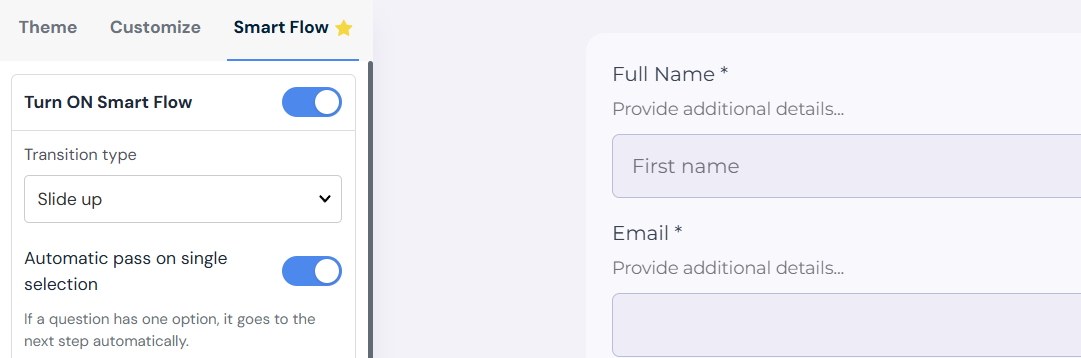
1. Log in to SmartFormify – Access your account from the dashboard.
2. Create a new form or select an existing form – Open the form where you want to enable Smart Flow.
3. Go to the Design section – Click on the Smart Flow tab.
4. Enable Smart Flow – Turn on Smart Flow. It will load with default settings, which you can customize based on your requirements.
5. Confirm Smart Flow is enabled – Once activated, you will see a yellow star icon at the top right corner of the form builder.
That’s it — Smart Flow is now enabled and ready to use.
Final Thoughts
If you want to improve form completion rates and provide a better user experience, enabling Smart Flow in SmartFormify is a smart choice.
It turns ordinary forms into interactive, user-friendly experiences that reduce drop-offs and help you collect more responses.
Ready to capture your next big lead? Create your first SmartFormify form now.

Share this post


Latest posts
8 min read
How to Collect Leads From ChatGPT, Lovable, Bolt and Other AI Websites
7 min read
How to Connect AI Built Websites to a Form Backend
8 min read
How Agencies Can Manage Client Website Forms More Efficiently
8 min read
Best Contact Form Solution for Small Businesses
5 min read
How to Centralize Leads From Multiple Websites