
How to Store Website Form Submissions in One Dashboard
Learn how to store website form submissions in one dashboard so you can organize enquiries, manage leads, and never lose important customer messages.
Every website form has one purpose.
To collect information from your visitors.
Whether someone is requesting a quote, booking a service, asking a question, or applying for a job, every submission represents an opportunity.
The problem is that many businesses still depend entirely on email.
An email arrives, someone reads it, and then it slowly disappears into a busy inbox.
As the number of enquiries grows, finding old messages becomes more difficult.
That is why more businesses are choosing to store website form submissions in one dashboard instead of relying only on email notifications.
Why Email Alone Is Not Enough
Email notifications are useful because they let you know when someone submits a form.
However, they were never designed to be a complete submission management system.
Emails can:
- Be deleted accidentally
- Go to the spam folder
- Be buried under newer messages
- Be difficult to search later
- Be missed during busy days
When your business receives dozens or even hundreds of enquiries each month, email quickly becomes difficult to manage.
What Is a Form Submission Dashboard
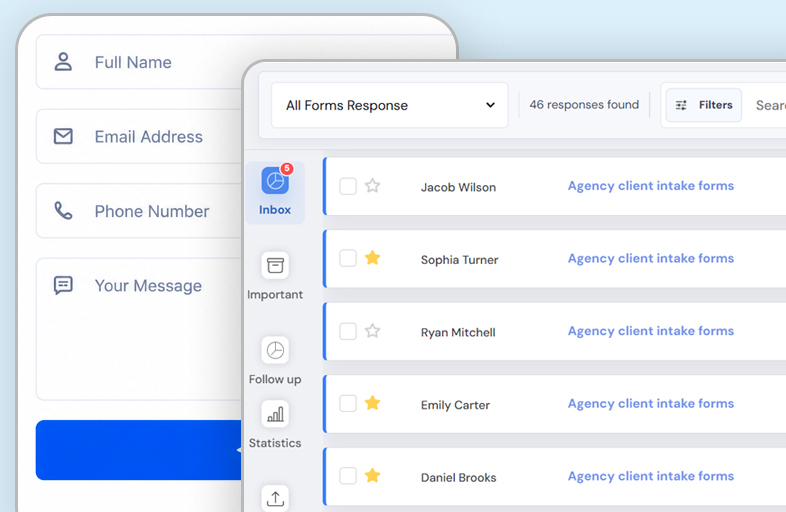
A form submission dashboard is a central place where every enquiry is stored.
Instead of searching through email folders, you can open one dashboard and view every submission from your website.
This makes it much easier to stay organized and manage customer communication.
Keep Every Submission Safe
Every customer enquiry has value.
Someone requesting a quote today may become a customer next week.
Someone asking a question may contact you again in a few months.
When submissions are stored in one dashboard, they remain available whenever you need them.
Even if an email is deleted, the original submission is still available.
Manage Multiple Forms Together
Many businesses have more than one website form.
For example:
- Contact form
- Quote request form
- Booking form
- Support form
- Feedback form
Instead of checking different systems for each form, you can collect every submission in one dashboard.
This gives your team one place to manage all customer enquiries.
Search Previous Enquiries
Finding an old email can take several minutes.
Finding a submission in a dashboard usually takes only a few seconds.
You can quickly review:
- Customer names
- Email addresses
- Phone numbers
- Messages
- Submission dates
This makes follow up conversations much easier.
Respond Faster
When everything is organized, your team spends less time searching and more time helping customers.
A dashboard helps you quickly identify new enquiries and respond before potential customers move on to another business.
Fast responses create a better customer experience and often improve conversion rates.
Keep Your Team Organized
If more than one person handles customer enquiries, organization becomes even more important.
Without a central dashboard, different team members may search different email accounts or accidentally miss important messages.
A shared dashboard helps everyone work from the same information and reduces confusion.
Continue Receiving Email Notifications
Using a dashboard does not mean giving up email notifications.
In fact, the two work well together.
Email lets you know immediately when someone submits a form.
The dashboard keeps a permanent record of every submission.
This gives you both convenience and reliability.
Help Reduce Spam
Spam messages waste time and make it harder to find genuine customer enquiries.
A good submission system should help reduce unwanted submissions while keeping legitimate enquiries easy to manage.
When spam is filtered more effectively, your dashboard stays cleaner and your team can focus on real customers.
Connect Your Existing Website Forms
Many businesses think they need to replace their contact forms to improve submission management.
That is usually unnecessary.
You can keep your:
- Existing contact form
- Quote request form
- Booking form
- Support form
The only change is where the submissions are stored.
Your website continues looking exactly the same while every enquiry is saved in one dashboard.
SmartFormify Connect Makes It Easy
With SmartFormify Connect, you can connect your existing website forms to SmartFormify without changing their design.
Once connected, SmartFormify can:
- Store every submission
- Send notification emails
- Display after submission messages
- Help reduce spam
- Keep customer enquiries organized in one dashboard
This allows you to continue using the website you already have while giving your business a much better way to manage enquiries.
A Practical Example
Imagine a marketing agency with several forms on its website.
One form collects general enquiries.
Another collects project requests.
A third allows businesses to request a consultation.
Without a dashboard, every submission arrives as a separate email.
Finding previous conversations becomes difficult as the inbox grows.
After connecting these forms to SmartFormify, every enquiry is stored in one place.
The team can quickly search submissions, review customer details, and respond without searching through hundreds of emails.
Test Your Form Regularly
After connecting your forms, submit a few test enquiries.
Check that:
- Submissions appear in the dashboard.
- Notification emails arrive.
- Customer information is saved correctly.
- Thank you messages display properly.
- Everything works as expected.
Regular testing helps ensure your website continues collecting enquiries successfully.
Common Mistakes to Avoid
Many businesses rely only on email and never store submissions anywhere else.
Others use several different systems for different forms, making customer management more complicated than necessary.
Some never test whether submissions are actually being saved.
Avoiding these mistakes helps ensure every enquiry is received and managed properly.
Final Thoughts
Every website enquiry is an opportunity to start a conversation with a potential customer.
Relying only on email makes it easy for important messages to be missed or forgotten.
Storing website form submissions in one dashboard gives your business a reliable way to organize enquiries, search previous conversations, and respond more efficiently.
With SmartFormify Connect, you can keep your existing website forms while storing every submission in one central dashboard, making customer communication simpler, more organized, and easier to manage as your business grows.
Share this post


Latest posts
8 min read
How to Collect Leads From ChatGPT, Lovable, Bolt and Other AI Websites
7 min read
How to Connect AI Built Websites to a Form Backend
8 min read
How Agencies Can Manage Client Website Forms More Efficiently
8 min read
Best Contact Form Solution for Small Businesses
5 min read
How to Centralize Leads From Multiple Websites